
News

Public Works and Underground Utilities: How to Stay Competitive in an Increasingly Challenging Market

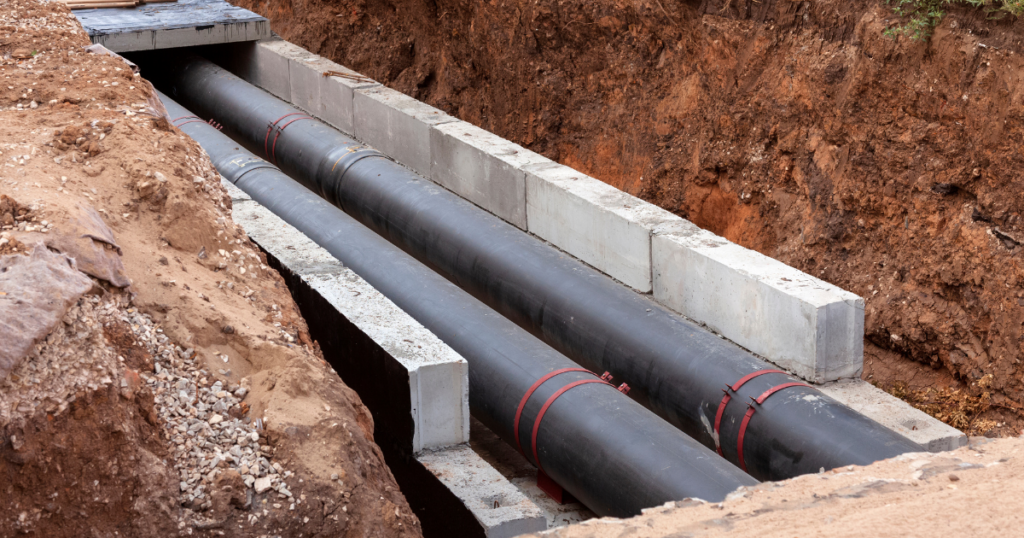
Since 2020, crises have piled up one after another. COVID-19, the wars in Ukraine and the Middle East, soaring energy prices, shrinking public budgets, labor shortages and the climate emergency have all forced the public works sector to adapt rapidly. In 2026, uncertainty continues to grow. Faced with external pressures that companies cannot control, how can they continue to improve their performance? In this article: An industry under pressure for far too long The lasting energy shock Local government budget constraints Climate pressure: an issue that can no longer wait The recruitment crisis The hidden costs Taking back control of what you can control Technology doesn’t replace people—it empowers them. What this means in practice An industry under pressure for far too long The current year presents a particularly challenging landscape for the public works sector. Over the past six years, successive crises have left lasting impacts on costs, supply chains, margins and long-term business visibility. Against this already difficult backdrop, four major pressures are now converging. The lasting energy shock Brent crude oil, the global benchmark for oil prices, reached around $120 per barrel at the end of April 2026[1], its highest level since 2022 following disruptions in the Strait of Hormuz. For public works companies, which rely heavily on diesel fuel and petroleum-based materials, this volatility translates directly into higher operating costs. The situation is even more challenging as most government support measures introduced during previous crises—such as energy subsidies and price caps—have already been largely exhausted. Fuel is only part of the problem. Bitumen prices have increased by 65% since the beginning of the conflict in the Middle East[2], resulting in a 10–12% increase in asphalt costs. At the same time, other bitumen-based materials have risen by between 5% and 35%, while PVC pipes have also been affected by higher raw material prices[3]. For contractors, the impact is immediate: higher energy prices place direct pressure on project profitability and cash flow. Local government budget constraints Local authorities account for 58% of France’s public infrastructure investment[4], yet they are operating under increasingly constrained budgets. Associations representing local governments estimate that their investment capacity could decline by as much as 20% in 2026[5]. More specifically, financial support for municipal investment has been reduced by €200 million in the 2026 budget[6], representing a drop of nearly 11%. Beyond the figures lies a broader governance issue. Many local authorities struggle to plan infrastructure projects beyond a single political term due to budget uncertainty. When priorities must be set, underground utility networks often compete with more visible public projects such as roads, public squares or urban redevelopment. As a result, the maintenance and renewal of underground infrastructure frequently take a back seat. Today, only 0.66% of drinking water networks and 0.48% of wastewater networks are renewed each year[7]. Climate pressure: an issue that can no longer wait France has nearly one million kilometers of drinking water pipelines and approximately 400,000 kilometers of wastewater networks. The average leakage rate across drinking water distribution systems has reached 18.8%, meaning network efficiency stands at only 81.2%[8]. This represents more than one billion cubic meters of water lost every year—the equivalent of around 400,000 Olympic-sized swimming pools. At a time of increasing water stress and recurring droughts, reducing these losses has become essential. The need to renovate, inspect and rehabilitate aging infrastructure is clear, yet these projects are constrained by the budgetary pressures described above. Between 2019 and 2024, annual public investment in water and wastewater infrastructure averaged €5.3 billion, but this remains well below estimated requirements[9]. The energy transition is further accelerating demand for new infrastructure projects. The expansion of renewable energy—solar farms, wind farms and photovoltaic canopies—requires new electrical grid connections. The rapid adoption of electric vehicles is driving municipalities to install increasing numbers of charging stations. Meanwhile, district heating networks, which play a key role in decarbonizing urban heating, require major investments in pipelines and associated infrastructure. Many of these projects, once financed primarily by local authorities, are now attracting private investment where economic returns are sufficient. The energy transition is reshaping the entire utility infrastructure sector, creating demand both for the renewal of existing networks and the construction of new electricity, heating and pipeline infrastructure. For public works companies, this represents a genuine growth opportunity. The recruitment crisis: the silent challenge The public works sector is facing a structural challenge that continues to worsen: attracting, training and retaining skilled professionals. With nearly 256,000 employees across 7,562 companies in 2024[10], the industry depends on highly specialized expertise that takes years to develop and is difficult to replace. Yet careers in public works—diverse, highly technical and meaningful—continue to struggle with recruitment due to a lack of visibility and recognition. This shortage affects every role, from field operations and engineering to office-based functions, forcing companies to rethink how they organize their work. When skilled staff become scarce, the challenge is no longer limited to recruitment and retention. It also becomes a question of working differently, training more effectively and extracting greater value from every working hour. Operational efficiency becomes not only a driver of performance but also a matter of long-term resilience. All indicators point in the same direction. Energy costs, public budgets, recruitment challenges and climate pressures continue to intensify with no sign of easing. Against this backdrop, the French National Federation of Public Works (FNTP) forecasts a 3.2% decline in production volume and a 1.9% decline in market value for 2026, while production costs are expected to rise by 1.3%[11]. Financial pressure across the entire industry is therefore expected to increase further. The Hidden Costs Faced with these pressures, one area remains firmly within a company’s control: operational efficiency. And this is precisely where margins are won—or lost. Public works companies negotiate purchasing contracts, optimize schedules and monitor margins down to the last euro. They know exactly what an hour of excavator time costs, what an idle truck represents and what delays from subcontractors mean financially. Yet there is another category of
Public Works and Underground Utilities: How to Stay Competitive in an Increasingly Challenging Market Read Post »

Geotopo and Syslor join forces to deliver a new generation of solutions for underground utility professionals.

Geotopo and Syslor are joining forces to deliver a new generation of solutions for underground utility professionals.

Geotopo and Syslor join forces to deliver a new generation of solutions for utility infrastructure professionals. Producing reliable, accurate and immediately actionable data has become a key challenge for professionals in surveying, civil engineering and utility infrastructure management. While GNSS receiver accuracy remains essential in the field, it is now only part of the equation. Today’s professionals are looking for solutions that provide a seamless workflow from data capture to office processing while meeting the increasingly demanding requirements of infrastructure owners and project stakeholders. It is precisely to address these evolving industry needs that Geotopo and Syslor have joined forces. A shared vision: combining the best of two areas of expertise Geotopo and Syslor are proud to announce a partnership built around a shared ambition: combining the precision and reliability of Trimble® GNSS solutions, distributed by Geotopo, with the innovation of Syslor’s field applications to deliver a seamless workflow from field data capture to office processing. At the heart of this collaboration is the Trimble® Catalyst™ DA2, renowned for its accuracy, robustness and reliability, and distributed and integrated by the Geotopo team. Complementing it is EasyScan, Syslor’s photogrammetry application, which streamlines field data capture and supports users all the way through to the production of final deliverables via the Syslor Portal. By bringing these complementary technologies together, the partnership aims to provide a simple, seamless and high-performance workflow capable of transforming the way utility infrastructure professionals operate. An approach designed for both field operators and surveyors This partnership goes far beyond hardware and software interoperability. It reflects a broader evolution in industry practices. Today’s professionals are no longer looking solely for high-performance equipment. They need an end-to-end workflow that connects field and office teams, eliminates unnecessary data re-entry and ensures the quality of the data produced. In the field, operators can complete photogrammetric surveys in just a few seconds. The georeferenced data is then automatically synchronized with the Syslor Portal, where surveyors can review, enrich and process the data, generate the required deliverables and export them in the formats expected by infrastructure owners, including RecoStaR for French utility operator Enedis. Key benefits for utility infrastructure professionals This collaboration enables users to: Improve the reliability of field data through the accuracy of Trimble GNSS technology. Simplify surveys with photogrammetric data capture using EasyScan. Enhance collaboration between field and office teams. Reduce manual data entry and minimize the risk of errors. Produce reliable, accurate and immediately actionable data. Generate deliverables that comply with Enedis requirements through export to the RecoStaR format. Increase productivity for both field operators and surveyors. While this new offering has been designed primarily for professionals working on electrical utility networks, it is intended to support a much broader range of utility infrastructure professionals looking to modernize their workflows with open, efficient and purpose-built solutions. The first step of a broader collaboration This announcement marks the beginning of a long-term collaboration that will soon lead to a joint offering, bringing together the best of both worlds: a high-performance solution that is easy to deploy, intuitive to use and perfectly suited to the realities of field operations. Today, performance is no longer defined solely by the quality of hardware or software, but by how seamlessly they work together. That is the vision Geotopo and Syslor are building together.

Geotopo and Syslor are joining forces to deliver a new generation of solutions for underground utility professionals. Read Post »

Notes géoréférencées - EasyView - Marquage-piquetage réalité augmentée - Syslor

Geolocated Site Notes: How to Enrich and Centralize Your Field Observations 

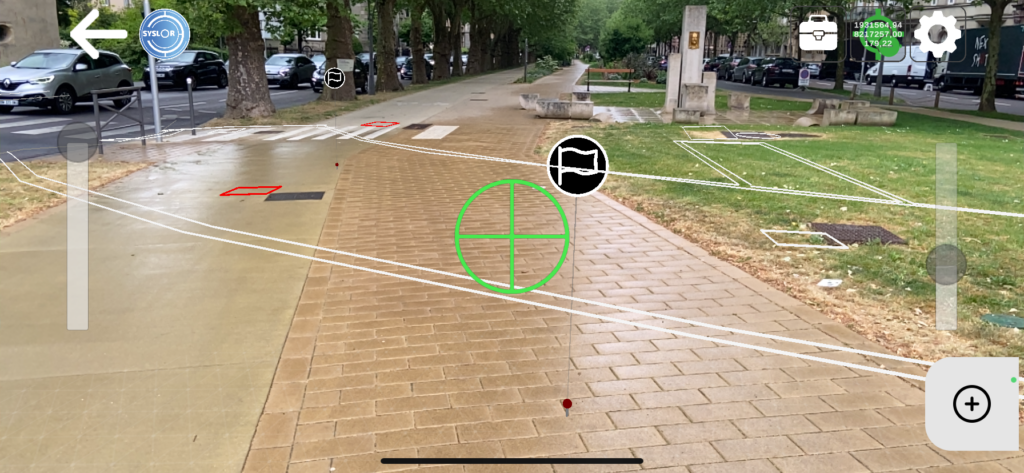
On a construction site, between an anomaly identified during excavation, a network connection to document, and an observation to report back to the office, field information often circulates poorly. Messaging apps, non-geolocated photos, paper notes: the risk of data loss or errors is real, and re-entering information in the office is time-consuming.  For Public Works stakeholders, the challenge is even greater: maintaining comprehensive and up-to-date documentation of their infrastructure is now essential, both to optimize project monitoring and to comply with regulations on the prevention of damage to underground networks.  EasyView now integrates a module for geolocated site notes to address this challenge — and contribute to better-documented networks with every intervention.  EasyView, Syslor’s Augmented Reality App for the Field EasyView is Syslor’s mobile application designed to visualize underground networks in augmented reality and achieve centimeter-level accuracy in RTK conditions, thanks to its connection with the Syslor GNSS receiver.  It allows field teams to load a network plan, overlay it onto the real-world view via a smartphone or tablet camera, and perform marking and staking operations with automatic generation of marking reports.  Geolocated Site Notes: How It Works EasyView users can now create notes directly from the map or from the augmented reality view. Each field note includes three components:  A free-text comment — observation, anomaly report, team instruction, as-built remark A photo — captured at the time of entry or imported from the gallery GNSS position — automatically recorded from the receiver at the time of entry Step 1: Blank form for creating a georeferenced note Step 2: Add a photo to the georeferenced note Step 3: Display of GNSS coordinates Notes are displayed as markers directly on the map and in the augmented reality view. The content of each note (comment and photo) can be accessed at any time from EasyView, both in plan view and augmented reality molde, as well as from the EasyDesk web portal. Here’s what the feature looks like in the EasyView app: Note markers – plan view Note marker – augmented reality view Visible note – augmented reality view On the web portal side (EasyDesk): Georeferenced note markers – plan view List of georeferenced notes for a project Real-World Use Cases on Site This feature addresses several operational needs across different field scenarios:  Identification and Reporting of Anomalies As soon as a non-compliance is identified — structural defect, deviation from plans, or damage — the operator creates a note on site, including a photo and precise location. The information is instantly available on the portal, with no delay or data loss. Pre-Project Phase During initial site inspections, observations collected in EasyView are directly integrated into the project. The engineering office receives a geolocated field report immediately after the visit, without any need for re-entry. Execution Monitoring Project managers can document progress site by site, build a geolocated history of inspections, and share this information in real time with office teams. Discovery of an Unknown Network When an unreferenced network is uncovered during construction, work is paused to assess the situation. Depending on the context, geolocated notes play a key role: in case of impact, they provide documentation for the joint damage report; if the network is inactive, they allow the discovery to be documented without necessarily halting project progress.  Automatic Centralization in the EasyDesk Portal All notes created in the field are synchronized with the corresponding project in the EasyDesk portal. All stakeholders with access to the project — surveyors, site managers, project managers — can view the notes directly from the portal map, with no file transfer or intermediate steps required.  Available Now Included in the latest EasyView update on iOS and Android, the geolocated site notes module is now available to all users. Contact us via the contact form. Want to see the feature in action? Request a demo. Prefer to reach out directly: contact@syslor.net

Geolocated Site Notes: How to Enrich and Centralize Your Field Observations  Read Post »

Scroll to Top