News

How Merging Orthophotos and Point Clouds Enhances Project Accuracy

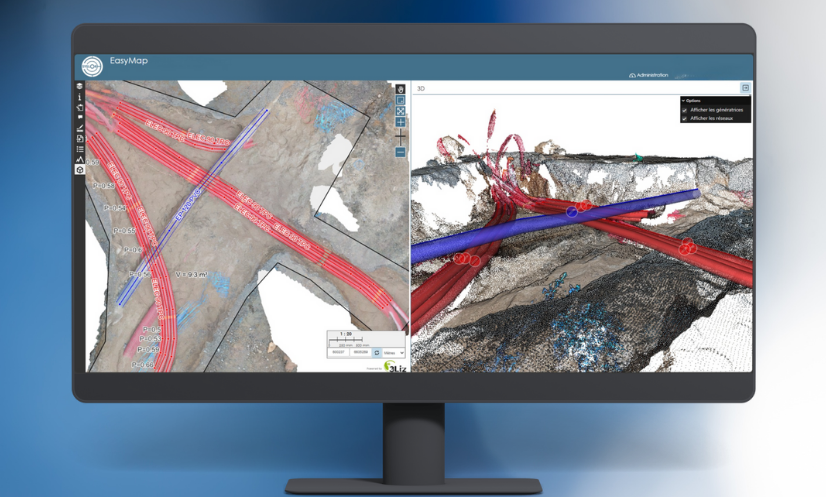
On construction sites, each photogrammetric survey generates its own dataset — an orthophoto, a point cloud, sometimes dozens of separate files to manage. Over time, these fragmented deliverables become difficult to work with. Misaligned joins, overlapping zones, or missing areas can compromise the overall topographic consistency of the project. For surveyors, engineering offices, and project managers, the issue is often the same: getting a comprehensive and accurate view of the site requires time-consuming manual work, which increases the risk of errors. This is exactly the challenge addressed by the merging of orthophotos and point clouds.By bringing all survey data together into a single, unified, georeferenced model, this process delivers a continuous, coherent, and readily exploitable view of the project. Beyond improving readability, accuracy, and efficiency across the entire production chain, it also saves a significant amount of time for survey teams when preparing their deliverables. To better understand its advantages, let’s start by defining what the merging of orthophotos and point clouds actually is. What Does Merging Involve? Merging consists of combining several separate orthophotos or point clouds into a single, unified, and consistent view, while preserving the original centimetric accuracy and georeferencing.Each area captured during the photogrammetric survey is repositioned within the same coordinate system to create a continuous mosaic of the project. The merging process relies on rigorous management of metadata and spatial coordinates. This ensures that all datasets align perfectly — without offset, elevation gaps, or quality loss. The result is a unified model that faithfully represents the entire site, enabling consistent and accurate measurements across the whole area. With this merging process in place, it becomes possible to visualize, measure, and vectorize an entire project from a single unified dataset, regardless of the project’s size or complexity. Now that the concept of merging is clear, let’s look at how it concretely improves the production and use of photogrammetric deliverables. Why Merge Your Photogrammetric Deliverables? Merging is not just a simple file combination — it’s a key step that allows teams to fully leverage the richness of photogrammetric data while ensuring the consistency of all deliverables.Here are the main advantages it brings, both in the field and in the office. Gain a Global View of the Project and In-Situ Context Merging provides a comprehensive view of the construction site, restoring the entire area within a single, continuous representation.It makes it possible to place each work zone within its broader environment — a valuable advantage for large-scale sites or linear projects such as roads, utilities, or railway corridors. This unified view helps teams understand how different areas interact, for example between the construction footprint, the surrounding environment, and existing underground or above-ground networks. Improve Vectorization Accuracy and Spatial Consistency By merging several orthophotos or point clouds within the same reference system, merging eliminates alignment errors between deliverables.It ensures a homogeneous topographic continuity, which is essential for: the precise vectorization of utility networks, the production of reliable as-built plans, and volume or surface calculations. Each measurement is therefore based on a coherent, georeferenced dataset, with no risk of misalignment between areas. Simplify the Use of Your Deliverables Through Centralized Data With merging, there’s no need to juggle multiple files anymore.Orthophotos and point clouds are grouped into a single unified view, speeding up processing and reducing the risk of errors during plan production or verification. This approach also simplifies importing deliverables into standard GIS or CAD software (DGN, DXF, CSV): a single, complete, georeferenced file, immediately ready for use by all project stakeholders. Enhance Collaborative Work By providing a single, consistent source of truth, merging makes collaborative work much easier.Everyone works from the same reference dataset, improving both validation and quality control of deliverables throughout the entire project lifecycle. Looking Ahead: Tracking Project Progress Over Time In the long term, merging opens the door to new possibilities: tracking the evolution of a construction site over time, overlaying successive surveys (before and after works), and building a true digital twin of the project. This approach will make it possible to accurately analyze site transformations — from earthworks to network installation — and to ensure complete traceability of all operations. How Syslor Facilitates the Merging of Orthophotos and Point Clouds The merging of orthophotos and point clouds truly reveals its value when it’s part of a seamless workflow — from data capture in the field to data processing and analysis. This is exactly what Syslor offers through two complementary solutions: EasyScan for photogrammetric surveying, and EasyMap for the visualization and processing of deliverables. EasyScan – Accurate and Standardized Photogrammetric Capture Everything starts in the field with EasyScan, the solution designed to perform georeferenced photogrammetric surveys. Each survey performed with the EasyScan application ensures centimetric accuracy and structured, standardized data.As a result, right from the survey phase: orthophotos and point clouds are perfectly aligned within the same reference system; deliverables are immediately available in EasyMap for further processing and analysis. EasyMap – Merging and Centralized Management of Deliverables Once the surveys are completed, EasyMap (formerly Sysmap) takes over. The tool, available directly through the Syslor web portal, assembles orthophotos and point clouds from different photogrammetric surveys to generate a unified overview of the entire project. The user then gains access to a comprehensive environment to: visualize the construction site as a whole, vectorize networks on a consistent base, perform measurements and volume calculations without discontinuities, and export reliable as-built plans with full confidence. This automation ensures a smooth, continuous production workflow, from field survey to final deliverable delivery. Ready-to-Use and Interoperable Deliverables Thanks to the complementarity between EasyScan and EasyMap, all data is aligned, merged, and immediately usable across any working environment — CAD, GIS, or collaborative platforms.The result: greater accuracy, less post-processing, and improved traceability throughout the entire project lifecycle. Want to learn more? Request a demo. A Unified Vision for More Accurate and Actionable Deliverables The merging of orthophotos and point clouds is not just a technical step — it’s a key requirement for ensuring the reliability and readability of

How Merging Orthophotos and Point Clouds Enhances Project Accuracy Read Post »

Nouveautés EasyMap Octobre 2025

Customized Attribute Libraries, 3D Editing, and Model Concatenation: What’s New at Syslor? 

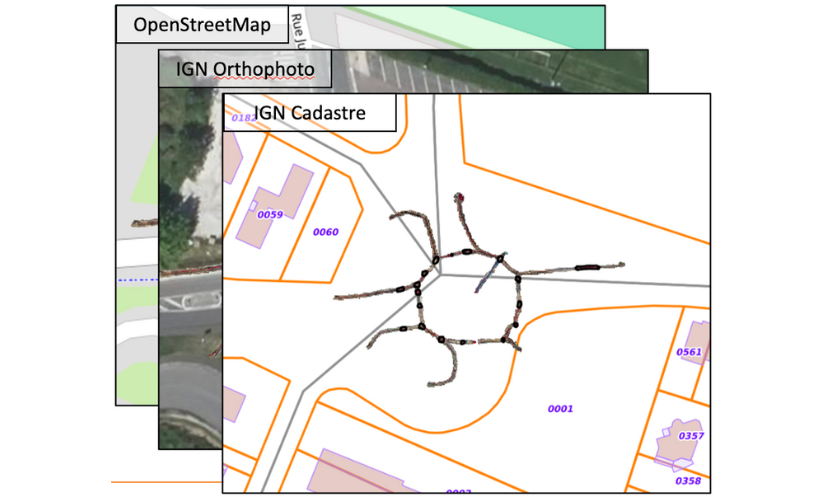
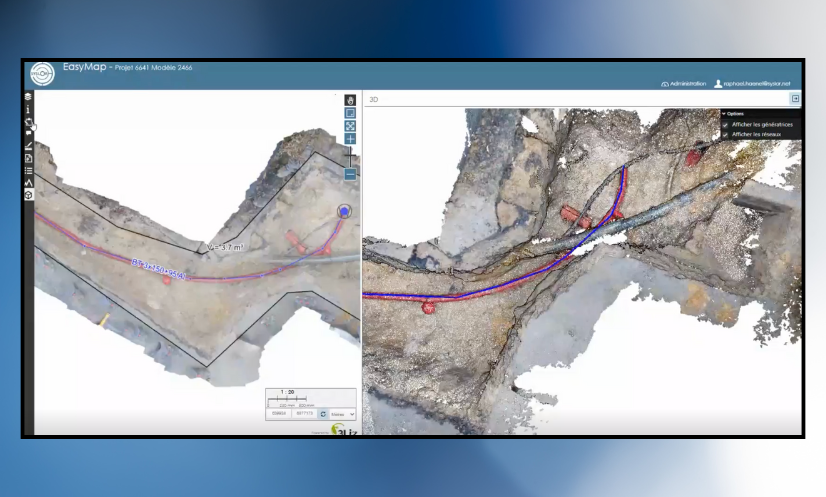
Syslor is enhancing its EasyMap platform with three new features that make daily operations even smoother for field and design teams. EasyMap is the drawing and tracing tool accessible directly from the Syslor portal, used by EasyScan users to edit orthophotos and point clouds generated from photogrammetric surveys. It enables users to transform survey data into usable plans, control altimetry, and monitor project progress.  The new features focus on three key aspects:  Customizable vectorization,  The move from 2.5D to full 3D,  Model concatenation for an overall project view.  All these improvements share a common goal: simplify deliverable production, increase accuracy, and ensure better continuity between all project stakeholders.  Customize Vectorization to Match Your Standards Attribute Libraries Tailored to Your Needs Every company applies its own mapping standards. EasyMap now includes customizable attribute libraries, grouping the necessary object families (electricity, water, heating, telecom, wastewater, etc.) in line with your internal practices. Ready-to-Use, Standards-Compliant Exports Generated plans automatically comply with your nomenclatures and export formats (DXF, DGN, etc.). No more manual adjustments — exports from EasyMap are structured, standardized, and complete, saving time and reducing the risk of error.  Control and Edit in 3D While Keeping the Simplicity of 2.5D The Limits of 2.5D 2.5D remains widely used because it’s lightweight and easy to handle. However, it reaches its limits when verifying altimetry or working with overlapping networks. On the other hand, navigating within a 3D view allows for continuous control, but it is less intuitive and straightforward due to the complexity of three dimensions. Dual View for Greater Precision EasyMap now offers a dual view: a classic 2.5D view on the orthophoto to maintain the simplicity of tracing, a 3D view of the point cloud to verify altimetric consistency and interact directly with objects. Thanks to this combination, it is now possible to: draw networks on the orthophoto while simultaneously checking the accuracy and diameters within the point cloud, edit in 3D, allowing users to trace networks or modify a point directly in the point cloud and instantly visualize the impact on the orthophoto. This interaction between the point cloud and the orthophoto greatly enhances the accuracy of as-built documentation. Concatenate Models for a Complete Project Overview Global Project Management and Tracking Model concatenation automatically groups multiple photogrammetric surveys into coherent zones. This provides not only a macro view of the project but also continuous monitoring of its progress. This global approach facilitates project management, team coordination, and the progressive updating of data throughout the project. Global statistics (lengths, network types, progress rates) offer a clear and centralized overview. The choice of the background map allows for better contextualization of the project. Continuity and Unified Export Overlapping areas are automatically flagged as attention points. A dedicated process ensures topological continuity between models, reducing connection errors and ensuring smooth, uninterrupted tracing. The entire project can then be exported as a single, consistent file in all standard industry formats. Result: a single, fast, and consistent export, directly usable in standard industry formats (CSV, DXF, DGN, etc.), with no manual post-processing required. A Step Toward Greater Automation These new features already simplify users’ daily workflows by reducing manual corrections and improving coordination. They also mark the next step in Syslor’s broader roadmap: 3D tracing, AI-assisted drawing, and georeferenced annotations will soon further enrich the EasyMap experience.

Customized Attribute Libraries, 3D Editing, and Model Concatenation: What’s New at Syslor?  Read Post »

Proteus: A Labeled Innovation for Smart Utility Network Management

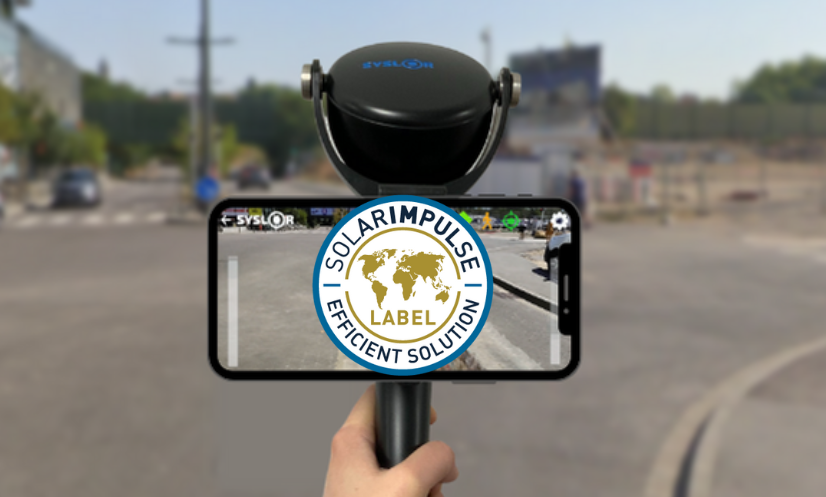
The Proteus GNSS receiver labeled “Solar Impulse Efficient Solution” In a world where environmental challenges are becoming increasingly urgent, concrete and cost-effective solutions are essential. In this context, Syslor was awarded the “Solar Impulse Efficient Solution” label in 2021 for its GNSS receiver named Proteus, marking a key milestone in its commitment to sustainable innovation. In 2024, this recognition was renewed, highlighting the continued relevance of the Proteus solution in addressing the challenges of ecological transition. What is the “Solar Impulse Efficient Solution” label? Created by the Solar Impulse Foundation, founded by Swiss explorer Bertrand Piccard, this label recognizes solutions that combine environmental performance with economic viability. Its goal is to promote 1,000 clean technologies capable of accelerating the ecological transition without compromising profitability. To earn this label, each solution is assessed by independent experts based on three criteria: feasibility, environmental impact, and profitability. Proteus: A Labeled Innovation for Smart Utility Network Management The Proteus technology, developed by Syslor, has successfully met these strict requirements.It is a real-time geo-referencing solution for underground utility networks, which enables: Reduced costs related to interventions and network damage Lower environmental impact of construction works Improved accuracy and traceability of operations Smoother communication between construction and public works stakeholders Thanks to this innovation, local authorities, public works companies, and utility managers have a practical tool to reduce their carbon footprint while optimizing their operations. View the official Proteus listing on Solar Impulse A Recognition That Reinforces Syslor’s Mission Being labeled by the Solar Impulse Foundation means joining an international community of providers of sustainable and efficient solutions. For Syslor, it represents a strengthened commitment to meaningful and responsible innovation. The renewal of the label in 2024 confirms the robustness and added value of Proteus, and reinforces our ambition to provide stakeholders with practical tools to address the challenges of the energy transition — with a focus on local impact, reliability, and performance. In conclusion By joining this initiative, Syslor is committed to putting technology at the service of a more sustainable future — without compromising on efficiency.

Proteus: A Labeled Innovation for Smart Utility Network Management Read Post »

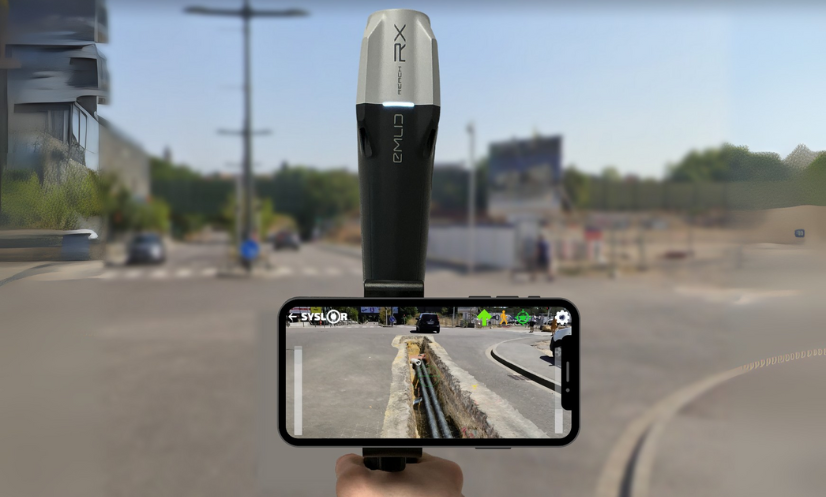
SYSLOR Solutions Now Compatible with New GNSS Receivers: Focus on Emlid’s Reach RX / RS3

The Reach RX/RS3, like many other GNSS receivers, uses the NMEA format, a universal standard for transmitting positioning data. By leveraging this protocol, we ensure that our applications are compatible with a wide range of GNSS receivers available on the market. This standardized approach offers several advantages: Simplified integration with various GNSS equipment Proven reliability in data transmission Greater flexibility in choosing your hardware With this in mind, we have expanded the compatibility of our applications to include Emlid Reach RX and Reach RS3 GNSS receivers, carefully integrating their technical features (offsets, inertial measurement unit, etc.). A More Open SYSLOR Ecosystem, Designed for Real-World Field Operations Practically speaking, you can now connect your Reach RX/RS3 directly to: EasyField, for intuitive staking and topographic surveying, EasyView, to visualize your networks, plans, and 3D models in augmented reality, EasyScan, to capture your trenches from a video and generate a certified as-built plan (Class A certification). All on Android, with no complex setup: direct Bluetooth connection, automatic GNSS stream recognition, and continuous RTK service support. Choosing SYSLOR Means Choosing a Field-Centric Solution Intuitive interface, even without surveying experience Web portal for project data tracking and management Real-time synchronization between the field and the office A responsive hotline to support you daily Regular technical updates and new features Our promise: to support you from the field to the office with a coherent, scalable system tailored to your real-world needs. Already Working with a Reach RX? Activate Compatibility Today Already using a REACH RX/RS3 on your projects and want to benefit from SYSLOR’s features? Contact our team at contact@syslor.net to activate the connection and start your projects without delay.

SYSLOR Solutions Now Compatible with New GNSS Receivers: Focus on Emlid’s Reach RX / RS3 Read Post »

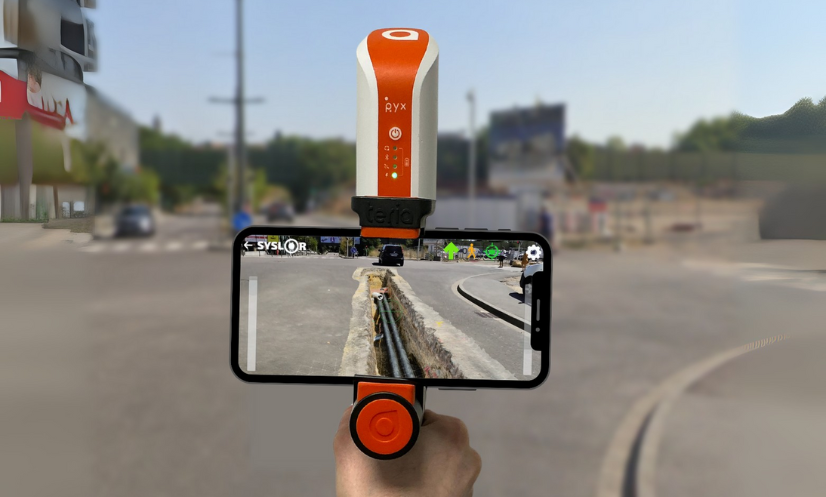
SYSLOR Apps and Teria’s PYX GNSS receiver: Precision and Simplicity for Safer, Faster Worksites

To provide field operators with powerful software solutions and support them more effectively in their daily challenges, SYSLOR has extended the compatibility of its solutions to a new flagship GNSS receiver. A Hardware-Software Partnership Serving On-Site Precision By partnering with Teria, SYSLOR reinforces its ability to deliver a simple, reliable, and autonomous working environment tailored to the needs of modern utility and infrastructure worksites. Beyond the technical aspects, this compatibility reflects a shared vision of on-site performance, driven by two companies with the same ambition: to innovate with solutions designed and manufactured in France. A Connected and User-Friendly Environment SYSLOR solutions are designed to be accessible to all field operators, without requiring technical expertise. They are compatible with all Android smartphones and tablets, and are supported by a collaborative web portal aimed at surveyors, CAD designers, and other stakeholders — enabling centralized data processing, project tracking, and streamlined deliverable management. Seamless Compatibility Within the SYSLOR Ecosystem Thanks to GNSS protocol integration, SYSLOR solutions can be connected to the PYX GNSS receiver immediately via the mobile applications installed on phones or tablets, ensuring a smooth, reliable, and ready-to-use field experience. Integrating PYX into SYSLOR’s Technical Environment To ensure full compatibility with the PYX, our engineers integrated the receiver into the SYSLOR portal and synchronized the antenna, handle, and camera constants with the three SYSLOR applications: EasyField for precise staking and data collection of points, lines, and surfaces EasyView to visualize underground networks in augmented reality directly in the field EasyScan to capture open trenches (photogrammetry) and generate a compliant as-built plan with class A accuracy The user’s usual RTK correction service can still be used, regardless of the worksite conditions. This development strengthens SYSLOR’s commitment to delivering an interoperable, intuitive, and ready-to-deploy work environment that meets the growing demands of underground infrastructure projects and enhances the overall user experience. Do you already use a Pyx receiver and want to connect it to SYSLOR applications? Write to us at contact@syslor.net to activate the connection and get started quickly.

SYSLOR Apps and Teria’s PYX GNSS receiver: Precision and Simplicity for Safer, Faster Worksites Read Post »

Scroll to Top