
orthophoto

EasyMap News - October 2025

Customized Attribute Libraries, 3D Editing, and Model Concatenation: What’s New at Syslor? 

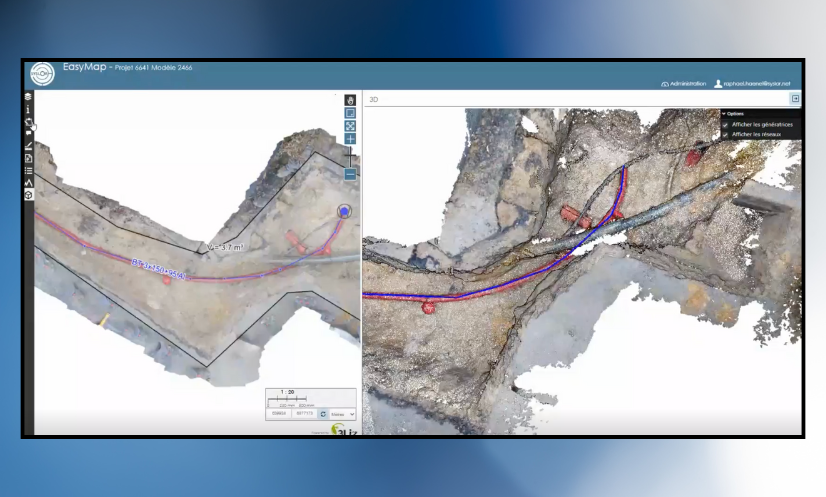
Syslor is enhancing its EasyMap platform with three new features that make daily operations even smoother for field and design teams. EasyMap is the drawing and tracing tool accessible directly from the Syslor portal, used by EasyScan users to edit orthophotos and point clouds generated from photogrammetric surveys. It enables users to transform survey data into usable plans, control altimetry, and monitor project progress.  The new features focus on three key aspects:  Customizable vectorization,  The move from 2.5D to full 3D,  Model concatenation for an overall project view.  All these improvements share a common goal: simplify deliverable production, increase accuracy, and ensure better continuity between all project stakeholders.  Customize Vectorization to Match Your Standards Attribute Libraries Tailored to Your Needs Every company applies its own mapping standards. EasyMap now includes customizable attribute libraries, grouping the necessary object families (electricity, water, heating, telecom, wastewater, etc.) in line with your internal practices. Ready-to-Use, Standards-Compliant Exports Generated plans automatically comply with your nomenclatures and export formats (DXF, DGN, etc.). No more manual adjustments — exports from EasyMap are structured, standardized, and complete, saving time and reducing the risk of error.  Control and Edit in 3D While Keeping the Simplicity of 2.5D The Limits of 2.5D 2.5D remains widely used because it’s lightweight and easy to handle. However, it reaches its limits when verifying altimetry or working with overlapping networks. On the other hand, navigating within a 3D view allows for continuous control, but it is less intuitive and straightforward due to the complexity of three dimensions. Dual View for Greater Precision EasyMap now offers a dual view: a classic 2.5D view on the orthophoto to maintain the simplicity of tracing, a 3D view of the point cloud to verify altimetric consistency and interact directly with objects. Thanks to this combination, it is now possible to: draw networks on the orthophoto while simultaneously checking the accuracy and diameters within the point cloud, edit in 3D, allowing users to trace networks or modify a point directly in the point cloud and instantly visualize the impact on the orthophoto. This interaction between the point cloud and the orthophoto greatly enhances the accuracy of as-built documentation. Concatenate Models for a Complete Project Overview Global Project Management and Tracking Model concatenation automatically groups multiple photogrammetric surveys into coherent zones. This provides not only a macro view of the project but also continuous monitoring of its progress. This global approach facilitates project management, team coordination, and the progressive updating of data throughout the project. Global statistics (lengths, network types, progress rates) offer a clear and centralized overview. The choice of the background map allows for better contextualization of the project. Continuity and Unified Export Overlapping areas are automatically flagged as attention points. A dedicated process ensures topological continuity between models, reducing connection errors and ensuring smooth, uninterrupted tracing. The entire project can then be exported as a single, consistent file in all standard industry formats. Result: a single, fast, and consistent export, directly usable in standard industry formats (CSV, DXF, DGN, etc.), with no manual post-processing required. A Step Toward Greater Automation These new features already simplify users’ daily workflows by reducing manual corrections and improving coordination. They also mark the next step in Syslor’s broader roadmap: 3D tracing, AI-assisted drawing, and georeferenced annotations will soon further enrich the EasyMap experience.
Customized Attribute Libraries, 3D Editing, and Model Concatenation: What’s New at Syslor?  Read Post »

Photogrammetry: principles, method and use cases

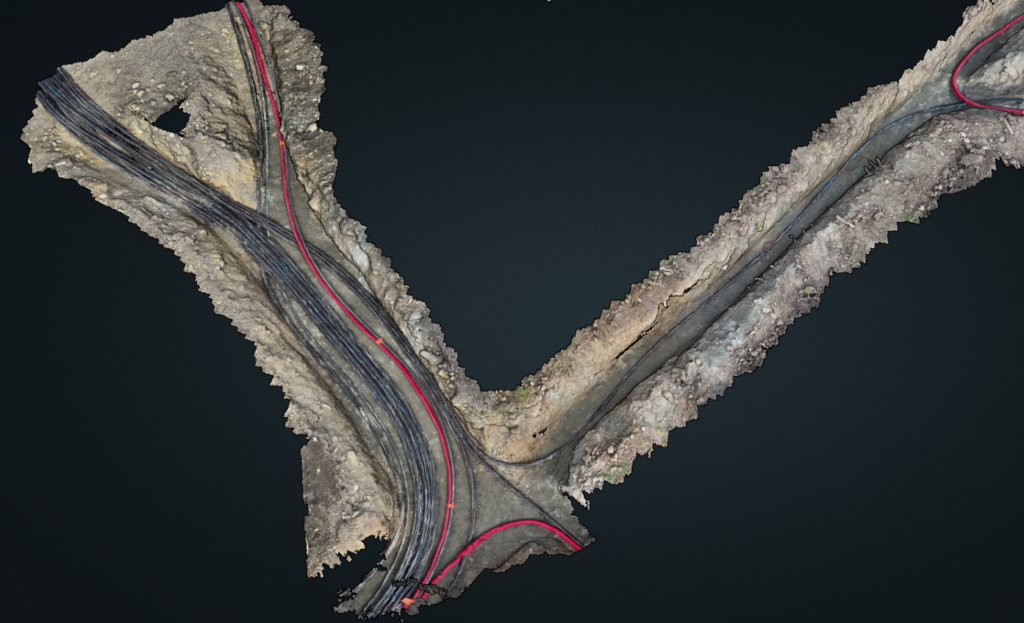
What is photogrammetry? Photogrammetry is a technique for generating 3D restitution from 2D images. In practice, it makes it possible to model terrain with high precision, without contact, by exploiting the principle of parallax between several photos taken from different angles. Historically, it was first used in geomatics. Today, this method finds concrete applications in the fields of topography, public works, and network management. For its part, Syslor leverages photogrammetry using video captures made directly in the field by users via the EasyScan application, from a smartphone or tablet. These videos are then processed to produce georeferenced orthophotos and 3D models that can be used in our visualization and vectorization portal. Finally, this article outlines the basic principles of photogrammetry, its key steps, the deliverables generated, as well as its main field applications. Types of photogrammetry (analytical, digital) Depending on the evolution of techniques and available tools, photogrammetry can be implemented in different ways. Two main approaches are generally distinguished, which differ in their level of automation and the calculation methods used: Analytical photogrammetry: based on manual or semi-automated geometric calculations. Digital photogrammetry: fully computer-based, it relies on matching algorithms and image processing. How does photogrammetry work? Beyond its theoretical principle, photogrammetry relies on a well-structured processing workflow that transforms simple images into usable geometric data. From the automatic identification of common points to the generation of orthophotos and 3D models, each step contributes to ensuring the precision and consistency of the final result. Here are the main stages of this process: Matching of homologous points The software automatically identifies identical points (tie points) present in multiple images, usually by using correlation methods or feature detection. In practice, this avoids the need for the operator to manually capture every detail and ensures a solid foundation for reconstructing the site in 3D. Parallax and triangulation in photogrammetry The difference in angle between images makes it possible to calculate the 3D position of each point through triangulation. This mathematical process results in an accurate 3D model of the trench or surveyed surface, which can then be directly used to measure distances, depths, or verify the location of utilities. Image overlap conditions (forward and side overlap) To obtain a coherent and complete model, it is necessary to ensure: A forward overlap of at least 70% between two consecutive images, A side overlap of at least 30% between two flight lines. In practice, this means that operators must capture photos or videos in a regular and structured way, ensuring that the software can accurately reconstruct every part of the site without missing areas. Steps of the photogrammetry processing workflow Image alignment: recognition of common points and relative orientation. Generation of the 3D point cloud: dense, structured, and accurate. Production of the DTM/DSM: extraction of topographic surfaces. Orthophotography: planar, distortion-free, and georeferenced projection. Data export: standard formats for GIS/CAD integration. Photogrammetry deliverables: what results can you obtain? Orthophoto A georeferenced image in planar projection, free from distortion, that can be used as a base map for layouts or surveys. It is the equivalent of a “photo plan” of the construction site, serving as a reliable background for mapping utilities and producing a compliant as-built record. Digital Surface Model (DSM) and Digital Terrain Model (DTM) DSM (Digital Surface Model): includes visible surface objects (vegetation, buildings). DTM (Digital Terrain Model): represents only the bare ground surface, without obstacles. Photogrammetric 3D point cloud Resulting from triangulation, it enables the detailed reconstruction of terrain, structures, and volumes. For the user, this is equivalent to having a digital copy of the site, which can be revisited at any time to perform measurements or provide evidence of the work carried out. Export to GIS / CAD formats The data can be exported in standard formats (.tif, .las, .dxf, .shp, .gml, etc.) for integration into CAD or GIS software. Photogrammetry in the field: what is it used for? Photogrammetry is particularly useful for: Large-scale surface surveys, even in areas that are difficult to access. Construction site visualization, including topography, access, obstacles, and interfaces. Utility marking and as-built plans, where orthophotos allow the visual integration of surveyed networks. Vectorization within professional platforms, where the orthophoto serves as a reliable base for accurately mapping utilities, as in the Syslor interface. Applying photogrammetry to underground utility mapping and as-built documentation In the context of underground utility as-built surveys, photogrammetry provides an effective response to both regulatory and operational requirements. In practice, from videos or images taken during trench openings, it is possible to generate georeferenced orthophotos and 3D point clouds that accurately document the condition of the terrain and the position of installed utilities. Subsequently, the data are integrated into GIS, CAD, or CAE environments using standard formats (.tif, .las, .dxf, .shp, .gml), thus ensuring their usability by all project stakeholders. When combined with centimetric GNSS positioning (RTK/NRTK) or ground control points (GCPs), this method guarantees absolute accuracy in line with as-built requirements. The benefits of photogrammetry in this context are multiple: Damage evidence: the orthophoto serves as an objective record in the event of damage to utilities or incidents related to construction work. Traceability and history: each intervention is documented and archived, providing a reliable basis for monitoring utilities. Damage prevention: accurate knowledge of the subsurface and existing utilities reduces risks during future operations. Asset management: the generated data enrich cartographic databases and facilitate the long-term management of infrastructures. Ultimately, by combining photogrammetry with centimetric GNSS measurements, it becomes possible to produce an as-built survey that is exhaustive, accurate, and reliable as a reference in the event of inspections or disputes. This approach effectively addresses safety, regulatory compliance, and cost-control challenges related to damages. With EasyScan, operators simply record the trench using a smartphone. The videos are automatically transformed into georeferenced orthophotos and accurate 3D models, which are then integrated into the Syslor portal for vectorization. Combined with the centimetric GNSS receiver Proteus, the solution ensures a reliable as-built survey that is immediately usable by all project stakeholders. In summary Photogrammetry is a

Photogrammetry: principles, method and use cases Read Post »

Scroll to Top